
Agents in parallel
Up to eight active panels in the same grid, with visible status and work queues.

Data in harmony with tomorrow.
A shared workspace with AI. Agents, research, documents and tools connected to what you want to accomplish.
In orch.space, coordinate a fleet of agents in visible panels. Each agent has its own conversation and task; a central agent connects their work, with persistent memory and access to your workspace tools.
Explore intelligenceorch.space capabilities, according to the September 2026 product catalog.
Up to eight active panels in the same grid, with visible status and work queues.
Organize different work streams, keeping up to eight active simultaneously.
A catalog through Composio, with more than 10,000 actions and integrated authentication.
The central agent distributes the work; each agent works on a different stream.
You follow, review and approve proposed actions.
A diagram of the workflow. Work streams vary according to the task.
Choose a view to explore the workspace organization and the agents' work.
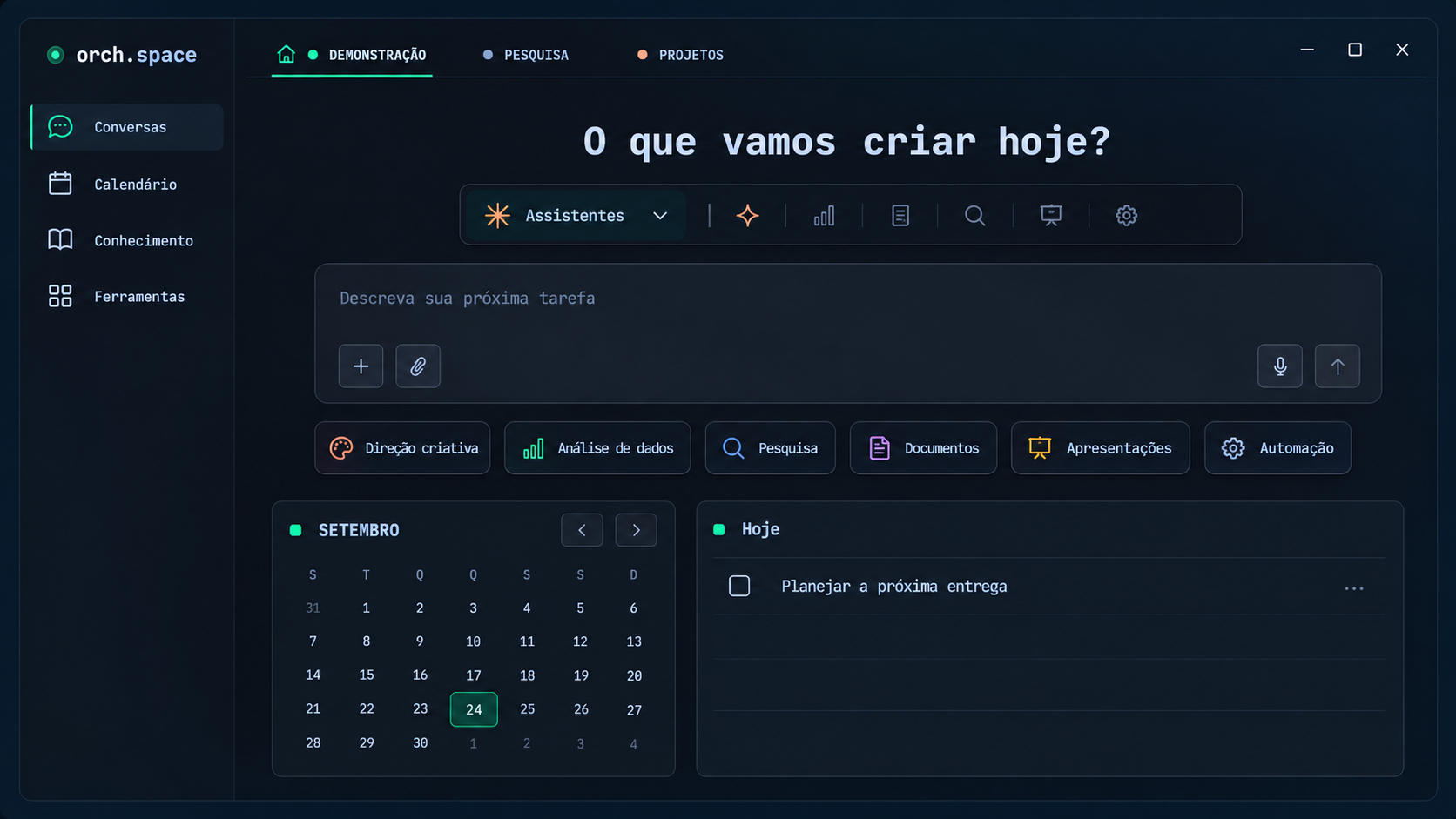
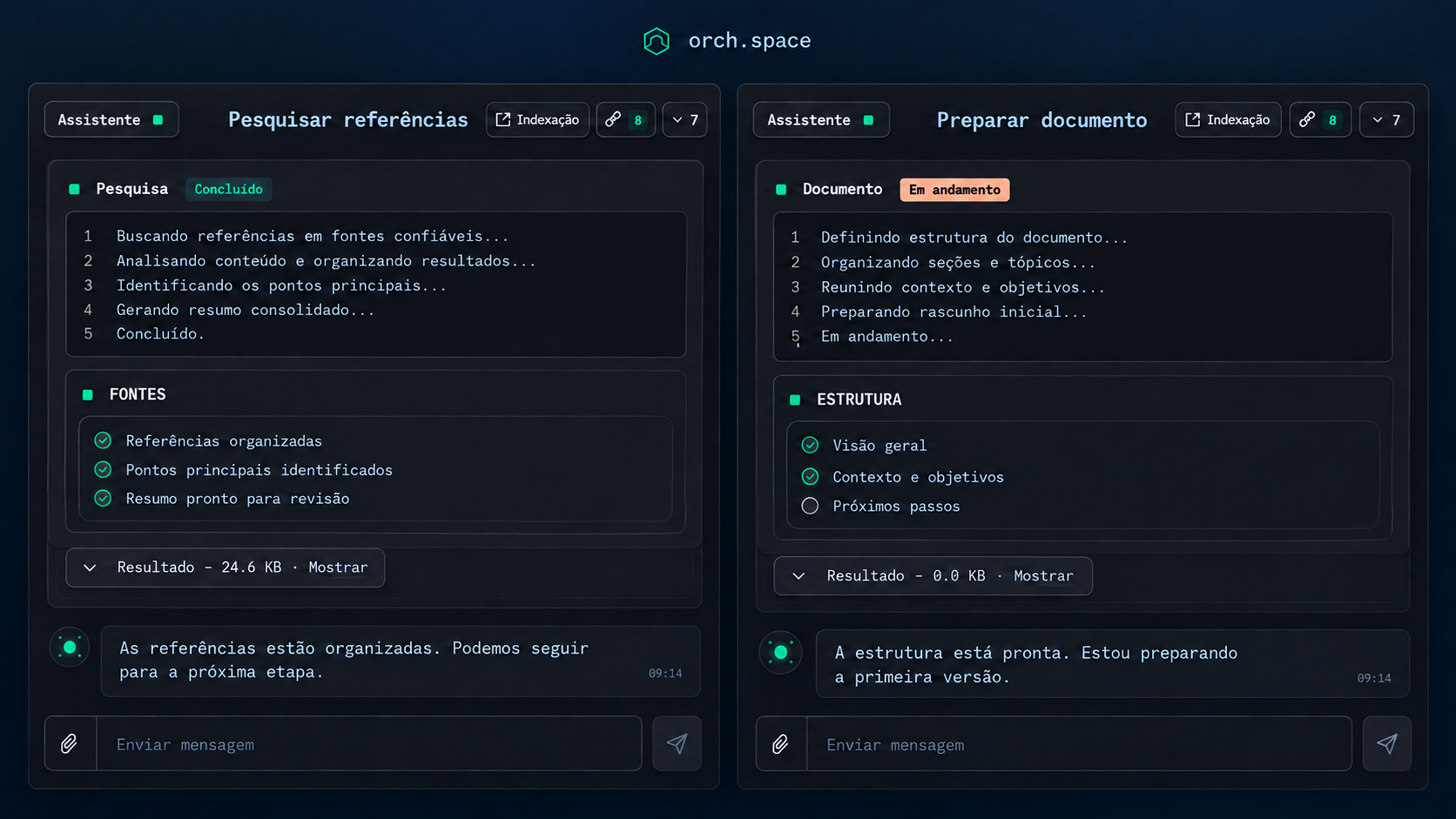
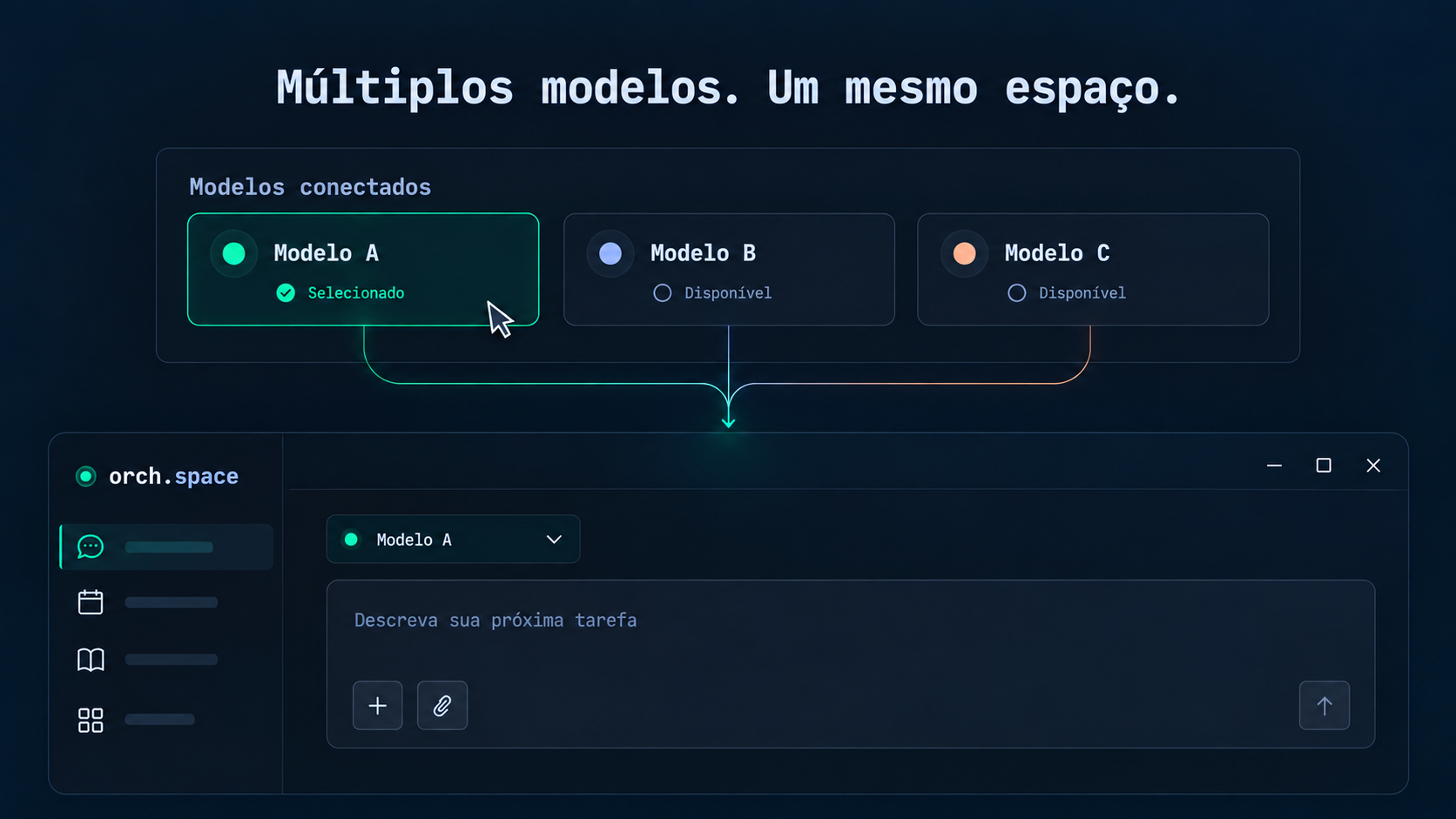
Illustrations adapted from platform screenshots, with demonstration content.
Agents work together.
You keep the direction.
A central agent coordinates the work. Other agents research, create and operate tools in parallel. Memory connects what has already been learned; you follow the steps and review proposed actions.
Distribute tasks between agents, follow their status and bring their work together in an environment with independent conversations and central coordination.
Research documents, books, videos and audio. Consult answers with citations and revisit decisions with context preserved in memory.
Connect applications, work on documents and spreadsheets, and organize tasks. Suggestions and proposed actions go through your review.
Agents propose. You review the content and approve what should proceed.
As in an orchestra, data reveals its value when it finds context and works together.
This vision takes shape in orch.space: a space where agents, tools and people contribute to a common purpose. Technology expands possibilities; people give work its direction.
A choice gains context and provenance.
Understanding can be updated.
The previous decision remains accessible.
A representation of decision history in the knowledge graph.
Six pillars connect knowledge, creation and operations. See each one's role in your work.
Connections and permissions are configured in the workspace.
The knowledge graph keeps the history of facts and decisions, including when they are superseded. In the notebook, gather sources, search and explore answers with citations.
The Vault stores encrypted credentials and lets tools use them without placing them in the agent conversation. Workspaces separate access, projects and teams.
Integrate applications, MCP services and browser navigation. For technical teams, the platform also brings together Git, containers, debugging and API testing.
Write with suggestions to accept or reject, work in spreadsheets and organize deliverables in Kanban. Documents, books and tasks belong to the same environment.
Schedule runs, follow logs and turn meetings into proposed actions. Calendar, routines and tasks help organize the day.
Use the desktop application or access the WebUI in a browser. Local networking, Tailscale, voice and messaging channels expand the ways to follow your work.
Browse resources by work area.
Open a category to see tools, details and ways to use them.
Up to eight active panels and 64 per session, with queues, interrupted agent recovery, floating windows and drag-and-drop organization.
Fleet coordination with its own memory, accumulated knowledge retrieval and opening panels with work instructions.
Connect different AI models in the same environment and choose which to use. Availability depends on providers and configured integrations.
Detection of more than 20 command-line agents, including Codex and Claude Code. More than 12 ready-made assistants, customizable for research, presentations, planning and creation.
Extend agents with instructions in natural language. An MCP service configuration can be shared between workspace agents.
Record concepts, projects, decisions and their relationships. Superseded facts remain accessible, with history and provenance, in an interactive view.
Gather PDF, EPUB, video, audio, articles and code. Search combines meaning and keywords to retrieve information from sources.
Explore answers with citations, generate insights and podcasts from sources. In the library, read PDF and EPUB with notes, highlights, search and synchronized position.
Encrypted vault for API keys, logins and sessions. Tools receive credentials at the time of use, outside the agent conversation.
Separate credentials, notebooks, boards and teams by context, with PIN-protected switching.
Review proposed actions with content preserved until approval. Document suggestions can be accepted or rejected individually or in batches.
Imported materials are marked as untrusted content, separating documents and references from operational instructions.
More than a thousand connectable apps and ten thousand actions through Composio, with OAuth and event triggers. One connection serves the workspace agents.
More than 700 marketplace services and more than 15 native services. MCP is the protocol connecting agents to tools and information sources.
Run conversations on a schedule, pause routines and consult logs. Automations can work without the interface open while the service is running.
Follow the central agent through Telegram, Lark, DingTalk and WhatsApp, according to the integration configuration.
A block editor with reviewable suggestions, batch review and formatting presets, including ABNT.
Spreadsheets with column types and cooperative editing. Boards with customizable columns, priorities, checklists, comments and relationships between tasks.
Shared lists across chat, tables and the task widget. The taskboard supports two-way synchronization with compatible integrations.
Capture from Teams, Meet and Zoom, with transcription, synthesis and follow-up proposals sent for approval.
An organization chart with workload from Kanban, visual delegation, time blocks and a calendar with events, routines and meetings.
Automated browsing, live views, downloads and page inspection. A test browser lets you follow what the agent builds.
Git with branches, history and diffs; execution on the host or in containers; reusable run configurations with logs per project.
Breakpoints, variable inspection and step-by-step execution. API testing with collections, environments, checks and k6 load tests.
Image generation integrations and local ComfyUI workflows, including editing, upscaling and animation. Speech recognition and synthesis complete the experience.
Desktop application and WebUI, with local or remote access through Tailscale. Password or QR code entry and support for an installable web application.
Voice mode with speech recognition and synthesis. On Windows, the task widget is anchored to the desktop and synchronized with the platform.
More than eight languages, light and dark themes, configurable shortcuts, a command palette and centralized settings.
Session history and resumption, import and export, multiple tabs, notifications and previews of code, images, documents and diffs in conversations.
On the desktop, in the browser or in a conversation. Context follows the work.
Access your environment through the WebUI, connect remotely through Tailscale and follow the central agent through messaging channels. Voice, calendar and the task widget bring the platform into your daily life.
Research, creation, operations and organization in one space — with technology serving people.
Explore resourcesWhat we do
Elevate your business. Make time for your life.
For large companies, accounting firms, registry offices and law firms: organize email, analyze Excel spreadsheets, prepare PowerPoint presentations and draft Word documents and contracts, with human review.
AI agents and bots — your pets — support work routines and personal organization. You follow the tasks, review the results and keep the decisions, while making room for what matters beyond the screen.
AI agent orchestration platform
For companiesAgent fleets with human approval
For companiesThe agent never sees the secret in the clear
For companiesReal browser, your session, zero proxy cost
For companiesRuns on your machine or in your cloud
For companiesFixed scope, delivered outcome
For companiesYour life organised by agents — under your control
For youSecurity and control
orch.space is installed on your computer or on your company infrastructure. Your files do not have to go up to anyone else's cloud for the agent to work.
Passwords and access keys are kept in a vault. The agent uses the credential to act, but never sees the secret in plain text.
Every agent works inside an isolated space, the sandbox. An action that really changes something only happens after a person approves it.
ORCH Data is a Brazilian company and handles personal data under the LGPD, the Brazilian data protection law. You pay what was agreed, with no credits that evaporate at the end of the month.
Each of these guarantees is written out in our public documentation, including what we do and what we do not do yet. Read how each guarantee workscoming soon
Seats open in batches. No spam, no selling your data — leave whenever you want.